
Google Cloud DNS
Connecting Google Cloud DNS as a DNS provider in DNS Watchdog.
Overview
Google Cloud DNS is a managed DNS service running on Google's infrastructure. DNS Watchdog connects via a service account to discover zones and sync records.
Prerequisites
DNS Watchdog uses Workload Identity Federation to securely connect from AWS without static credentials. You'll need the following values to connect Google Cloud DNS to DNS Watchdog:
| Field | Description |
|---|---|
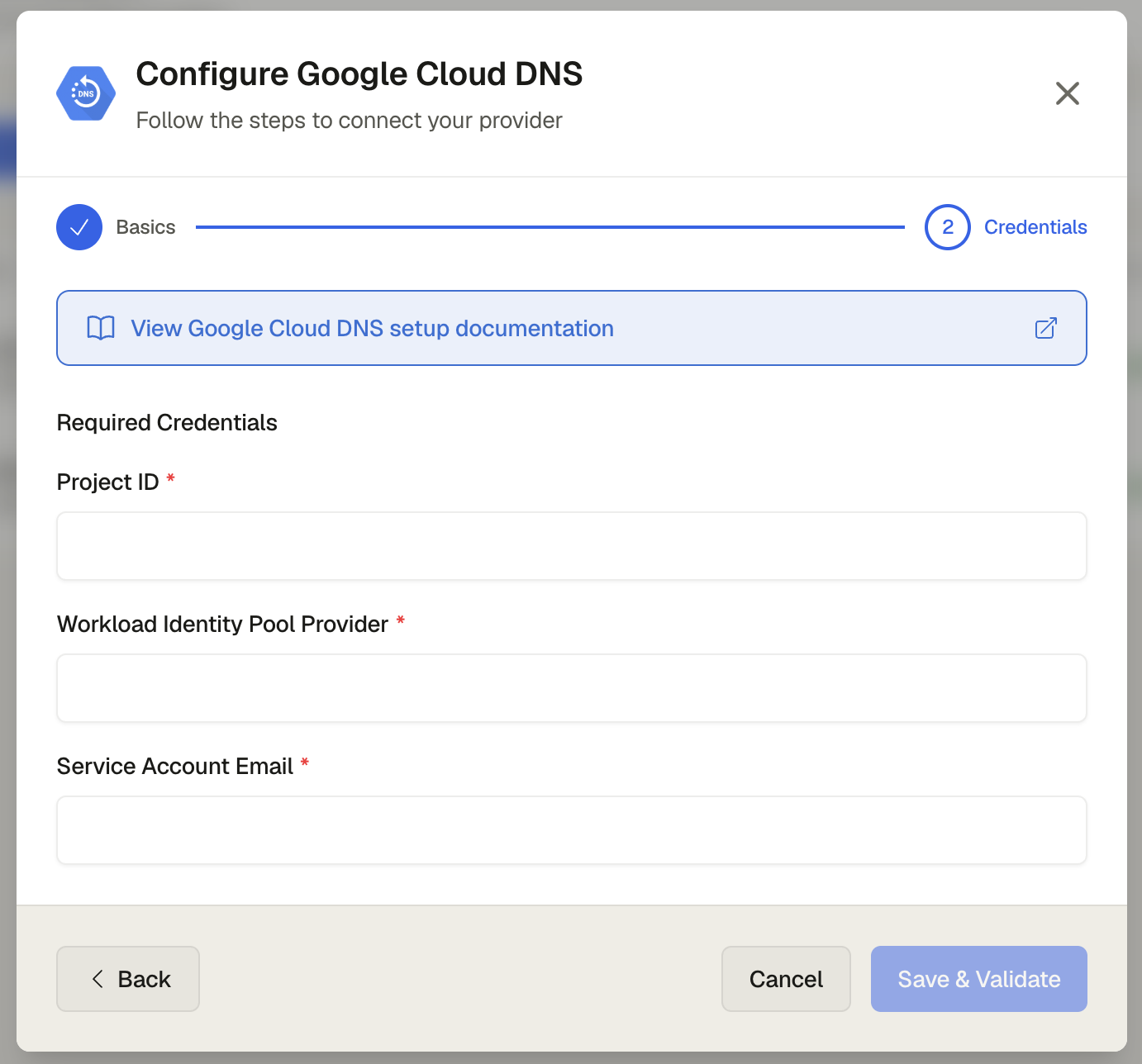
| Project ID | Your GCP project ID |
| Workload Identity Pool Provider | The full provider resource name (e.g. projects/PROJECT_NUMBER/locations/global/workloadIdentityPools/POOL_ID/providers/PROVIDER_ID) |
| Service Account Email | The email of the service account DNS Watchdog will impersonate (e.g. dnswatchdog@PROJECT_ID.iam.gserviceaccount.com) |
The CLI snippets below reuse shell variables (PROJECT_ID, POOL_ID, etc.). If you're using the CLI, set them once at the start of your session:
PROJECT_ID="YOUR_PROJECT_ID_HERE"
PROJECT_NUMBER="YOUR_PROJECT_NUMBER_HERE"
ME="user:you@example.com"
POOL_ID="aws-dnswatchdog"
PROVIDER_ID="aws-729428183456"
AWS_ACCOUNT_ID="729428183456"
SA_NAME="dnswatchdog"
SA_EMAIL="${SA_NAME}@${PROJECT_ID}.iam.gserviceaccount.com"
Granting yourself the required roles
Before you begin, make sure your own user account has the roles needed to create the resources below.
- Go to IAM & Admin → IAM in the Google Cloud Console
- Click Grant Access and add the following roles to your user:
- Workload Identity Pool Admin (
roles/iam.workloadIdentityPoolAdmin) - Service Account Admin (
roles/iam.serviceAccountAdmin) - Security Admin (
roles/iam.securityAdmin) - Service Usage Admin (
roles/serviceusage.serviceUsageAdmin) - Tag Administrator (
roles/resourcemanager.tagAdmin) - Tag User (
roles/resourcemanager.tagUser) - DNS Reader (
roles/dns.reader)
- Workload Identity Pool Admin (
for ROLE in \
  roles/iam.workloadIdentityPoolAdmin \
  roles/iam.serviceAccountAdmin \
  roles/iam.securityAdmin \
  roles/serviceusage.serviceUsageAdmin \
  roles/resourcemanager.tagAdmin \
  roles/resourcemanager.tagUser \
  roles/dns.reader
do
  gcloud projects add-iam-policy-binding "$PROJECT_ID" \
    --member="$ME" \
    --role="$ROLE"
done
Enabling APIs
Enable the Google Cloud APIs that DNS Watchdog relies on.
- Go to APIs & Services → Enabled APIs & Services
- Enable the following APIs:
- Identity and Access Management (IAM) API
- IAM Service Account Credentials API
- Cloud DNS API
- Security Token Service API
gcloud config set project "$PROJECT_ID"
gcloud services enable \
  iam.googleapis.com \
  iamcredentials.googleapis.com \
  dns.googleapis.com \
  sts.googleapis.com
Creating a Workload Identity Pool
The pool holds the trust configuration that lets AWS principals authenticate to Google Cloud.
- Go to IAM & Admin → Workload Identity Federation
- Click Create Pool
- Set the name to
aws-dnswatchdogand display name toDNS Watchdog, then click Continue
gcloud iam workload-identity-pools create "$POOL_ID" \
  --location="global" \
  --display-name="DNS Watchdog"
Adding an AWS provider to the pool
Add an AWS provider that trusts DNS Watchdog's AWS account and maps its attributes.
- Select AWS as the provider type
- Set the provider ID to
aws-729428183456and display name toAWS 729428183456 - Enter
729428183456as the AWS Account ID - Under Attribute Mapping, configure:
google.subject→assertion.arnattribute.aws_account→assertion.account
- Click Save
# Create the AWS provider (trust the AWS account)
gcloud iam workload-identity-pools providers create-aws "$PROVIDER_ID" \
  --location="global" \
  --workload-identity-pool="$POOL_ID" \
  --account-id="$AWS_ACCOUNT_ID" \
  --display-name="AWS ${AWS_ACCOUNT_ID}"

# Configure attribute mapping
gcloud iam workload-identity-pools providers update-aws "$PROVIDER_ID" \
  --location="global" \
  --workload-identity-pool="$POOL_ID" \
  --project="$PROJECT_ID" \
  --attribute-mapping="google.subject=assertion.arn,attribute.aws_account=assertion.account"
Creating a service account
DNS Watchdog impersonates this service account to manage your DNS zones.
- Go to IAM & Admin → Service Accounts
- Click Create Service Account
- Set the name to
dnswatchdogand display name toDNS Watchdog federated SA - Click Create and Continue
gcloud iam service-accounts create "$SA_NAME" \
  --display-name="DNS Watchdog federated SA"
Allowing the AWS principal to impersonate the service account
Grant DNS Watchdog's federated AWS principal permission to impersonate the service account.
- On the service account list, click the
dnswatchdogservice account - Go to the Permissions tab and click Grant Access
- In the New principals field, enter:
principalSet://iam.googleapis.com/projects/YOUR_PROJECT_NUMBER/locations/global/workloadIdentityPools/aws-dnswatchdog/attribute.aws_account/729428183456 - Add both of these roles:
- Workload Identity User (
roles/iam.workloadIdentityUser) - Service Account Token Creator (
roles/iam.serviceAccountTokenCreator)
- Workload Identity User (
- Click Save
MEMBER="principalSet://iam.googleapis.com/projects/${PROJECT_NUMBER}/locations/global/workloadIdentityPools/${POOL_ID}/attribute.aws_account/${AWS_ACCOUNT_ID}"

gcloud iam service-accounts add-iam-policy-binding "$SA_EMAIL" \
  --role="roles/iam.workloadIdentityUser" \
  --member="$MEMBER"

gcloud iam service-accounts add-iam-policy-binding "$SA_EMAIL" \
  --role="roles/iam.serviceAccountTokenCreator" \
  --member="$MEMBER"
Granting Cloud DNS permissions
Give the service account read-only access to your DNS zones. See Permissions for the role DNS Watchdog needs.
- Go to IAM & Admin → IAM
- Click Grant Access
- Enter the service account email (
dnswatchdog@YOUR_PROJECT_ID.iam.gserviceaccount.com) as the principal - Assign the DNS Reader role (
roles/dns.reader) - Click Save
gcloud projects add-iam-policy-binding "$PROJECT_ID" \
  --member="serviceAccount:${SA_EMAIL}" \
  --role="roles/dns.reader"
Getting the provider resource name
The provider resource name is the value you'll paste into the Workload Identity Pool Provider field in DNS Watchdog.
- Go back to IAM & Admin → Workload Identity Federation
- Click the
aws-dnswatchdogpool, then theaws-729428183456provider - Copy the Provider Resource Name — this is the STS audience value
gcloud iam workload-identity-pools providers describe "$PROVIDER_ID" \
  --location="global" \
  --workload-identity-pool="$POOL_ID" \
  --format='value(name)'
For convenience, print all three values you'll need in DNS Watchdog:
echo "Project ID:                      $PROJECT_ID"
echo "Workload Identity Pool Provider: projects/$PROJECT_NUMBER/locations/global/workloadIdentityPools/$POOL_ID/providers/$PROVIDER_ID"
echo "Service Account Email:           $SA_EMAIL"
Adding the Provider in DNS Watchdog
- Go to Settings → Providers → Add Provider
- Select Google Cloud DNS as the provider type
- Enter your Project ID, Workload Identity Pool Provider resource name, and Service Account Email
- Click Save
Permissions
DNS Watchdog needs read-only access — assign the DNS Reader role (roles/dns.reader).