
IP Addresses
View all resolved IP addresses across your DNS estate — deduplicated with ISP geolocation, open port data, threat-intelligence blocklist status, associated domains, and infrastructure distribution analysis.
An IP Address represents a unique IPv4 or IPv6 address resolved from A or AAAA records. DNS Watchdog extracts and deduplicates IP addresses across your entire DNS estate — if multiple records resolve to the same IP, it appears once with links to all associated records and domains.
A Route 53 alias record (for example an apex aliased to CloudFront, a load balancer or S3) names its target rather than an address, so DNS Watchdog resolves the target on every scan and inventories the address it currently serves. CNAME targets are resolved the same way.
Each IP is enriched with ISP geolocation data, port scan results and its threat-intelligence blocklist status, giving you a consolidated view of your infrastructure. You can see which IPs are shared across domains, where they are hosted, what services are exposed, and whether any of them appear on a public blocklist.
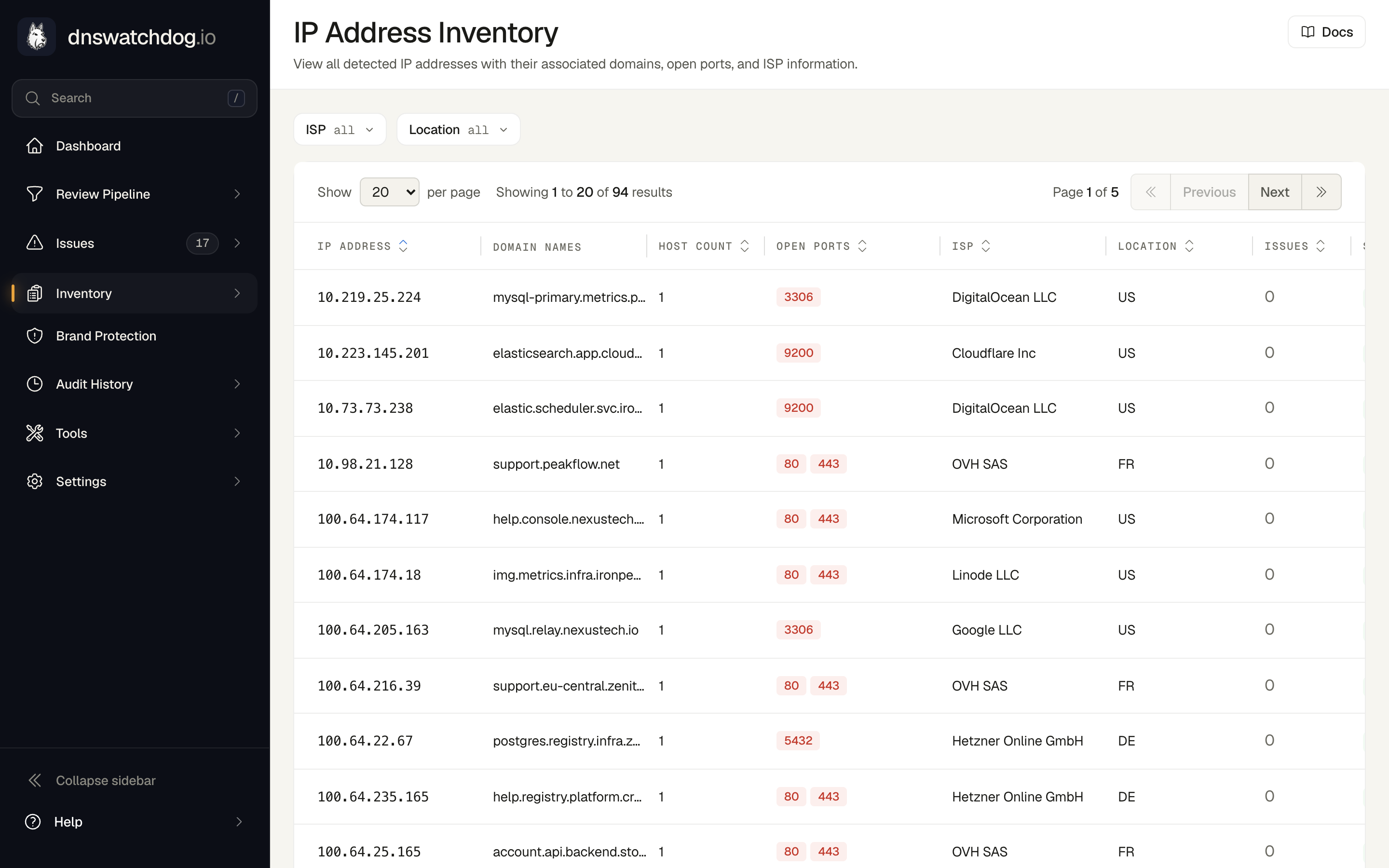
Key fields
Identity
| Field | Description |
|---|---|
| IP Address | The IPv4 or IPv6 address |
| IP Version | 4 (IPv4) or 6 (IPv6) |
| Primary Record | The first record that resolved to this IP |
| Associated Records | All DNS records that resolve to this IP |
| Domain Names | All FQDNs that point to this IP address |
ISP and geolocation
DNS Watchdog performs an ISP lookup for each IP address to provide network and geographic context:
| Field | Description |
|---|---|
| ISP | Internet Service Provider name (e.g. "Amazon.com, Inc.", "Cloudflare, Inc.", "Hetzner Online GmbH") |
| ISP Organisation | Organisation name registered with the ISP — may differ from the ISP name if the IP is allocated to a specific customer |
| ISP AS Number | Autonomous System number identifying the network (e.g. AS16509 for Amazon, AS13335 for Cloudflare) |
| ISP Country | Country where the IP is geolocated (e.g. "United States", "Germany", "Singapore") |
| ISP Region | Region or state within the country (e.g. "Virginia", "Bavaria", "Île-de-France") |
| ISP City | City where the IP is geolocated (e.g. "Ashburn", "Frankfurt", "Singapore") |
| ISP Lookup Status | Whether the geolocation lookup succeeded or failed |
| ISP Lookup Timestamp | When the geolocation data was last refreshed |
This data helps you understand your infrastructure's geographic distribution, identify unexpected hosting locations, and spot shadow IT or forgotten infrastructure.
Port scan results
| Field | Description |
|---|---|
| Open Ports | List of open TCP ports detected on this IP |
| Services Detected | Services identified on open ports (e.g. nginx/1.25, OpenSSH 9.6, MySQL 8.0) |
| Port Scan Status | pending, completed, or failed |
| Port Scan Timestamp | When the last port scan was performed |
| Port Scan Error | Error details if the scan failed |
Blocklist status
Every public IP in the inventory is checked against an aggregated threat-intelligence blocklist during the daily scan. The blocklist combines Spamhaus DROP, IPsum and FireHOL Level 1, refreshed every 6 hours.
Private, loopback, link-local, carrier-grade NAT, documentation, reserved and multicast addresses (such as 10.0.0.5 or 192.168.1.10 in an internal A record) are never reported as listed. They are not reachable from the internet, so no reputation blocklist applies to them, and they show Not listed.
| Field | Description |
|---|---|
| Blocklist | Listed when the IP appears on one or more of the aggregated blocklists, together with the providers that list it; Not listed otherwise. Once you ignore the listing's issue the column shows Listed · ignored |
| Listed on | The upstream blocklist providers that currently list the IP |
| First detected | When DNS Watchdog first found the IP on a blocklist |
A listing raises an IP Blocklisted issue that resolves automatically once the IP is no longer on any blocklist. Sort the table by the Blocklist column to bring listed IPs to the top, and open an IP to see its providers and a link to the issue.
Associated issues
| Issue | Severity | Description |
|---|---|---|
| Inactive IP Address | Low | No open ports or services detected — host may be down, fully firewalled, or decommissioned |
| Unresponsive Host | Low | Ports are open but the host does not respond to HTTP requests |
| IP Blocklisted | High | The IP appears on one or more threat-intelligence blocklists |
| All port exposure issues | Varies | Same port-related issues as Records apply at the IP level |
Port issues are raised at the IP level rather than per-record when multiple records share the same IP. This avoids duplicate alerts for the same underlying exposure.
Actions
- Lookup — perform an on-demand ISP lookup for an IP address
- View associated records — see all DNS records that resolve to this IP
- Filter by ISP, country, or AS number — narrow down IPs by network or geography
Common tasks
How do I identify shared infrastructure?
Sort or filter by IP address to find IPs with multiple associated records. If many domains resolve to the same IP, they share infrastructure — an issue on that IP (like an open port) affects all of them.
How do I find records hosted in unexpected locations?
Use the country or region filter to identify IPs geolocated outside your expected hosting regions. For example, if all your infrastructure should be in the US and EU, filter for other regions to spot anomalies.
How do I find decommissioned hosts?
IPs flagged with the Inactive IP issue have no open ports or services detected. This may indicate the host has been decommissioned, and the DNS records pointing to it are stale candidates for cleanup.
How do I find blocklisted IPs?
Sort the table by the Blocklist column in descending order: listed IPs come first, with the providers that list them shown beneath the badge. Each listing is also tracked as an IP Blocklisted issue on the Issues page.
How do I understand my hosting distribution?
Filter by ISP or AS number to see how your infrastructure is distributed across providers. This helps identify shadow IT, forgotten infrastructure, or unexpected dependencies on specific hosting providers.
Certificates
Monitor SSL/TLS certificates across your DNS estate — track expiry dates, detect hostname mismatches, identify weak keys, and manage certificate lifecycle.
Web Forwards
Track provider-managed DNS redirects (HTTP 301/302) — monitor target URLs, validate redirect chains, and detect broken forwards across CSC and UltraDNS providers.