
Zones
Browse all discovered DNS zones across your connected providers — view record counts, sync status, email security posture (SPF, DKIM, DMARC), and trigger re-discovery.
A Zone represents a DNS zone (e.g. example.com) discovered from a connected provider. Zones are the organisational unit that groups records together and the scope for email security checks.
When a provider syncs, DNS Watchdog discovers all zones under that account. Each zone tracks its record count, issue count, sync status, and email security posture (SPF, DKIM, DMARC).
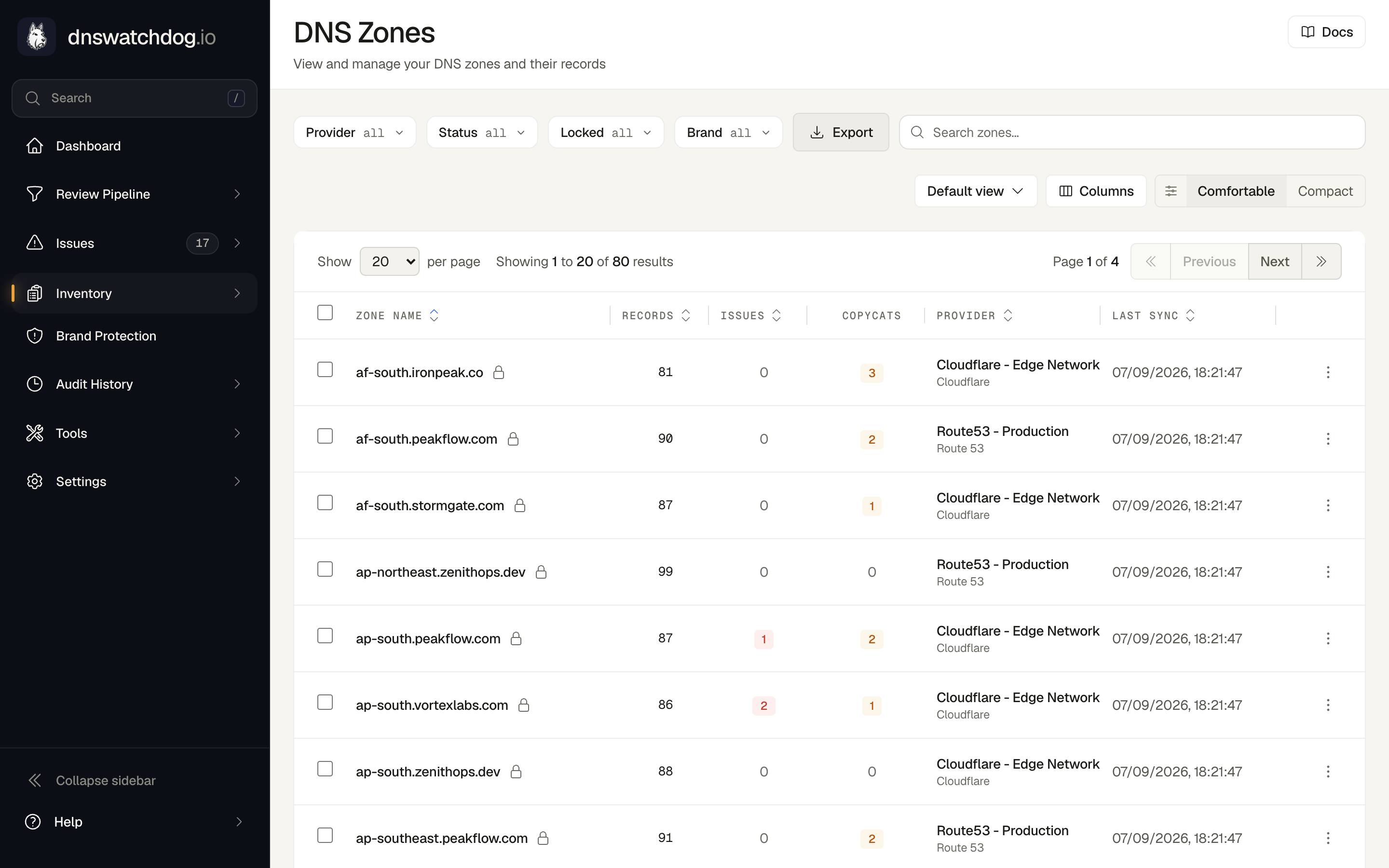
Key fields
| Field | Description |
|---|---|
| Name | The zone's domain name (e.g. example.com) |
| Provider | The provider this zone was discovered from |
| Status | Sync status: active, pending, error, or syncing |
| Record Count | Total number of DNS records in this zone |
| Issue Count | Number of open security issues across all records in the zone |
| Missing SPF | Flag indicating the zone has MX records but no SPF record |
| Multilocked | CSC-specific flag — zone changes require a phone call to CSC to unlock |
| Last Sync | Timestamp of the most recent record sync |
| Error Message | Details when the sync fails |
The filter bar narrows the table by provider, status, lock state and brand. Every filter also applies to the export.
Email security posture
DNS Watchdog checks each zone with MX records for the presence of email authentication records:
- SPF — Sender Policy Framework, defines which servers can send email for the domain
- DKIM — DomainKeys Identified Mail, allows recipients to verify message integrity
- DMARC — Domain-based Message Authentication, Reporting and Conformance, enforces email authentication policy
Zones missing any of these records will have issues raised automatically.
Associated issues
| Issue | Severity | Description |
|---|---|---|
| Missing SPF Record | Medium | Zone has MX records but no SPF record — any server can send email on behalf of this domain |
| Missing DKIM Record | Low | Zone has MX records but no DKIM record — recipients cannot verify message integrity |
| Missing DMARC Record | Medium | Zone has MX records but no DMARC record — no email authentication policy enforcement |
Exporting
Use the Export menu next to the filters to take the zone list out of DNS Watchdog:
| Option | Contents |
|---|---|
| Copy zone names | One zone name per line, copied to your clipboard — handy for pasting into a ticket, a script or another tool |
| Download CSV | Every field of every zone — name, status, provider, brand, domain type, cleanup recommendation and reason, record and issue counts, lock and SPF state, last sync, error, Jira ticket, timestamps and identifiers — one row per zone |
| Download Excel | A workbook with the same table on one sheet and an Export Info sheet recording when the export was generated, the filters and sort applied and the row count |
The export respects your current search, filters and sort order and covers every matching zone, not just the rows on the current page. The file is built server-side in a single request, so a large estate downloads in one go without paging through the table.
Actions
- Sync Records — trigger a manual re-sync of all records in the zone
- Delete Zone — remove the zone from DNS Watchdog (does not affect the DNS provider)
- Create Jira ticket — raise a ticket about the whole zone from the Jira column or the zone page header; shown only when a Jira connection is configured
Providers
View and manage your connected DNS providers — see connection status, zone counts, sync history, and credential health for Route 53, Cloudflare, CSC, Azure DNS, Google Cloud DNS, and UltraDNS.
Brands
Group your DNS estate by the brand each domain belongs to — inferred automatically by AI from your domain names, and correctable by hand.