
Change Detection Log
A detailed, chronological record of every change detected across your DNS infrastructure.
The Change Detection Log is a detailed, chronological record of every change detected across your DNS infrastructure. It captures all changes — including those made outside of DNS Watchdog, directly at the provider.
Change types
Changes are categorised by type:
| Change Type | Description |
|---|---|
| Record detected | A new DNS record was discovered during a scan |
| Record changed | An existing record's value, TTL, or other properties were modified |
| Record removed externally | A record disappeared from the provider — deleted outside DNS Watchdog |
| Zone detected | A new zone was discovered from a provider |
| Zone removed | A zone is no longer present at the provider |
| Issue detected | A new security issue was identified during scanning |
| Issue resolved | A previously detected issue is no longer present |
| Issue ignored | An issue was marked as ignored by a user |
| Issue note added | A note was added to an issue |
| Copycat domain detected | A Brand Protection finding rose to medium or high risk |
| Copycat domain changed | The page served by a finding you are watching changed |
Not every difference between scans is a change worth recording. In particular, DNS providers increment a zone's SOA serial number on every edit made anywhere in the zone, so an SOA record whose only difference is its serial is treated as unchanged and produces no entry. Changes to any other SOA field (primary nameserver, contact, refresh, retry, expire, minimum TTL) are recorded as Record changed with a before/after diff.
Likewise, when a record's value changes at the provider — an A record moving from one IP address to another, say — the change is recorded once, as Record changed with the old and new values, rather than as a removal followed by a detection. That pairing applies only to an unambiguous one-for-one swap: if one member of a multi-valued set (several NS or MX records at the same name) disappears, it is recorded as Record removed externally, because there is no single replacement value to pair it with.
Filtering
The Change Detection Log supports extensive filtering to help you find specific changes:
| Filter | Description |
|---|---|
| Change type | Narrow to a specific category (e.g. only record changes, only issues) |
| Zone | Filter changes to a specific domain |
| Scan | View changes from a particular scan run — links directly from Scan History |
| Date range | Filter by start and end date, with quick presets (7 days, 30 days, etc.) |
Change details
Expanding a change row shows a before/after diff view, highlighting exactly what changed.
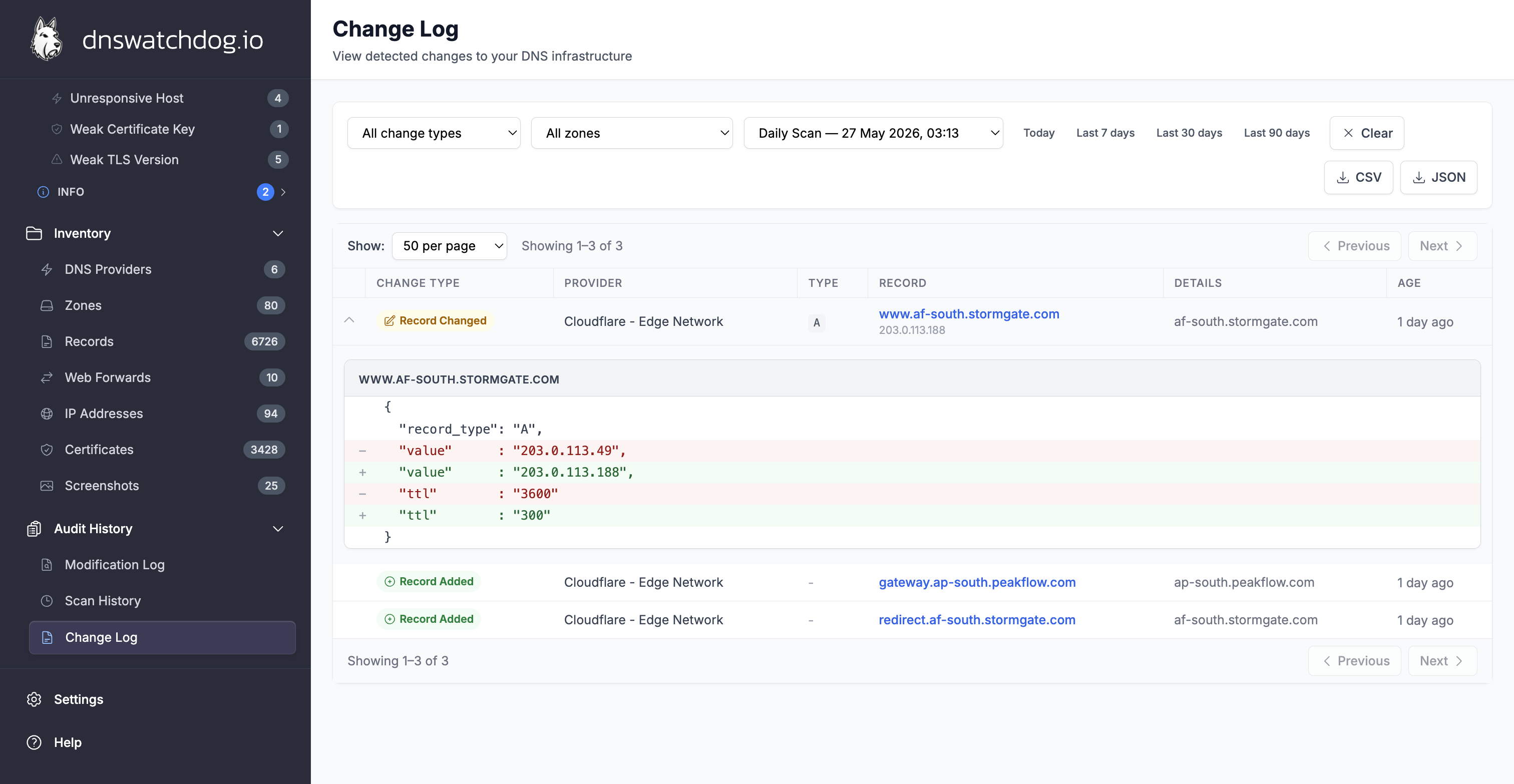
For record changes, this includes field-level diffs showing old and new values side by side — for example, an IP address changing from 198.51.100.5 to 198.51.100.10, or a TTL changing from 3600 to 300.
For new records and deleted records, the expanded view shows the full record details (hostname, type, value, TTL, zone).
For issues, the expanded view shows the issue type, severity, and the affected record.
Deep linking
The Change Detection Log supports deep linking via URL parameters. You can link directly to changes for a specific:
- Zone —
?zone=example.com - Scan —
?scan_id=...(used by the "View results" link in Scan History) - Provider —
?provider_id=...
This is useful for sharing specific change views with team members or bookmarking filtered views for regular review.
Exporting
Use the Export button in the top-right corner of the page to download the change log. A dialog asks which format you want:
| Format | Contents |
|---|---|
| CSV | One row per change — timestamp, change type, provider, record, value, details, zone and the before/after state — for spreadsheets and SIEM ingestion |
| JSON | The full change records, including the complete before and after values, for audit systems and scripting |
| Excel | A workbook with the change list on one sheet and an Export Info sheet recording when the export was generated, the filters applied and the row count |
The export respects your current filters and covers every matching change, not just the rows on the current page. The file is built server-side in a single request, so a large history downloads in one go without paging through the table.
Exports are capped at 10,000 changes per file. If your filters match more than that, the most recent 10,000 are exported and the app tells you so — narrow the date range, or add a zone or change-type filter, to export the rest.
Typical uses:
- Compliance reporting
- Integration with external audit systems (SIEM, ticketing, etc.)
- Offline analysis and archival